
Facilitation
Virtual Facilitation: 15 Tips That Actually Work

Laura Faint
As a Facilitator, the ability to confidently run high-impact virtual sessions opens up a lot of opportunities (versus just being able to facilitate in-person). Virtual facilitation is very different from in-person, and most of the instincts you've built up in physical rooms don't necessarily translate directly to a screen.
We've facilitated hundreds of virtual workshops and trained tens of thousands of people to do the same, and the patterns we see are remarkably consistent: energy drops faster online, people multitask the moment they feel passive, technical issues derail momentum at the worst possible times, and reading the room becomes nearly impossible when half the group has their cameras off.
The purpose of this article is to give you 15 practical virtual facilitation tips that actually hold up in real sessions, not theory, but things we've tested over and over with real clients. Whether you're facilitating your first virtual workshop or your fiftieth, our goal is that this article gives you something practical to try in your next session.
What Should You Do Before a Virtual Session?
A huge amount of the work in running a virtual session happens before anyone joins the call, and this is where you can really set yourself up for success. Here are some things you can do before your next virtual facilitation gig:
1. Schedule Shorter Than You Think
Whatever amount of time feels right, cut it by about 30%. A 4-hour in-person workshop should become 2.5 to 3 hours virtual (at most), or better yet, split it across two separate sessions. Attention spans are shorter online, energy depletes faster, and it's always better to leave people wanting more than to watch them checking email during the last hour. This is one of the most common mistakes we see from Facilitators who are used to in-person work and try to replicate it exactly online.
2. Over-Prepare Your Tech
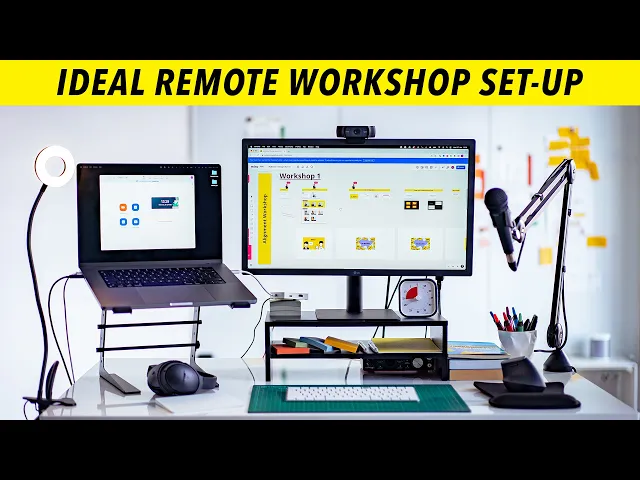
Test everything, and then test it again (and then maybe even again…). Is your video conferencing working? Screen sharing? Breakout rooms set up and ready? Digital whiteboard pre-loaded with your templates? Do you have a backup plan if something fails? Murphy's Law hits virtual sessions extra hard, and the tool you assumed would work will absolutely crash at the worst possible moment. Over-prepare by default and have a backup plan for your backup plan.
3. Design for Participation Every 5-7 Minutes
In person, you can talk for 15 minutes and still hold most of the room's attention. Online, you've probably lost them by minute 8. Ideally, you build interaction into every section: polls, chat responses, whiteboard input, breakout discussions, reactions and emojis. If participants are passive for more than 7 minutes, you're essentially inviting them to start multitasking.
4. Send Pre-Work (But Keep It Easy)
Give people something small to do before the session: read a one-page brief, answer two questions, review the agenda. This does two things that are both really valuable: first, it gets participants mentally invested in the session before they even arrive. Second, it creates content you can reference during the session itself (which makes everything feel more connected and relevant). Just keep the prep to 10 minutes or less, because realistically, people won't do more than that.
5. Recruit a Co-Facilitator
Virtual facilitation while also managing tech and logistics is chaotic. You're watching the chat, managing breakout rooms, sharing your screen, advancing slides, and trying to actually facilitate the conversation. If you can, bring someone to handle the tech logistics while you focus on the people.
How Should You Start a Virtual Session?
The first 10 minutes really set the tone for everything that follows, and starting well in an online session requires more deliberate effort than it does in-person.
1. Start with Connection, Not Content
People join virtual sessions from very different contexts. Someone might have just left a stressful call, someone could be working from their kitchen while kids run around, or someone might not have talked to another human in hours. Spending a few minutes helping people arrive mentally (a quick, low-stakes check-in question, a moment to say hello with cameras on and mics unmuted) can make an enormous difference. Jumping straight to business feels efficient but it actually costs you engagement for the rest of the session.
2. Set Explicit Virtual Norms
Things that are implicit in-person need to be made explicit online. It’s good to state the obvious and give people permission: "We’d ask that everyone turns their cameras on, it helps us connect and makes the session a lot more impactful", "If you need to step away, just drop a note in the chat.", "It's okay to move around, I'll be standing too.”, etc. This might feel unnecessary, but from our experience, most people are waiting for someone to tell them what's okay in this particular virtual space, and they'll default to passive if you don't.
3. Explain How Participation Works
Platforms work very differently, and you can't assume everyone knows their way around your tools. A quick tech orientation prevents confusion later. For example: "I'll use polls for quick votes, they'll pop up on your screen.", "For breakout rooms, you'll see an invitation, click accept.", "Raise your hand using the reaction button if you want to speak." Thirty seconds of explanation up-front can save minutes of confusion later.
What Works Well During the Session?
Now that you’re off to a smooth start, it’s time for your facilitation skills to shine. Here are some things you can do to make your virtual facilitation experience as strong and impactful as possible:
1. Over-Communicate Transitions
In person, transitions are obvious because you physically move, the energy shifts, and people can see what's happening. Online, people zone out, miss the shift, and suddenly they're completely lost. To fix this, name every transition clearly: "Okay, we're now moving from brainstorming to voting.", "In 2 minutes, I'll put you into breakout rooms.", "Before we switch topics, let me summarize where we landed." Repetition and over-communication aren’t annoying in a virtual session - it’s essential.
2. Use Breakout Rooms (Strategically)
Smaller group discussions are almost always better than full-group conversations online, because in breakouts, people actually talk instead of waiting their turn in a 20-person call. The key is: give crystal clear instructions before sending people off into breakout rooms (write them in the chat so people have a reference), keep breakouts short at 5-10 minutes, give a specific output like "come back with your top 2 ideas," and announce when time is almost up. The single biggest mistake we see is unclear instructions, which means people spend half their breakout time figuring out what they're supposed to be doing.
3. Make the Invisible Visible
You can't read body language the same way online, so you need to create other ways to surface what's happening in the group. For example, "give me a thumbs up if this is clear, thumbs down if it's not","Rate your energy 1-5 in the chat", "Quick poll: are we ready to move on?". These micro-check-ins replace the room-reading you'd naturally do in person, and they're one of the most underused virtual facilitation techniques we see.
4. Embrace the Chat
Have people respond to questions in chat before discussing verbally, ask for reactions while someone is talking, post key points and decisions as you go, and let people ask questions without interrupting the flow. Some Facilitators dislike chat because it feels chaotic, but engagement beats silence every time.
5. Call on People (Warmly)
In person, eye contact naturally invites people to speak. Online, silence can just create more silence. Don't be afraid to call on people directly: "Sarah, you've done this before, what's your take?", "I'd love to hear from someone who hasn't spoken yet.", "John, I saw you nodding, want to add something?" The key is doing it warmly, like you're genuinely curious about their perspective, not like a teacher catching a distracted student.
6. Build in Movement
Sitting still for hours is terrible for engagement and energy, and this is something most virtual Facilitators forget entirely. Build in moments to stand up and move for a stretch or coffee break. A pro-tip: playing some energizing music and encouraging participants to move in whatever way they’re comfortable with.

How Should You End a Virtual Session?
How you close your session determines whether anything actually sticks, and this is where virtual sessions are particularly vulnerable because the ending can feel abrupt and disconnected.
Instead, make the ending explicit: summarize key decisions, state action items and who owns them, clarify next steps, and ask for final thoughts. Then send a follow-up within 24 hours with everything documented, because what happens after the call is genuinely as important as what happened during it.
What Tools Help with Virtual Facilitation?
You don't need fancy tech, but the right tools make virtual facilitation noticeably smoother.
Video conferencing - Zoom is still the standard for workshops (Google Meet and Teams work too, but know your platform inside out, including breakout room functionality).
Digital whiteboards - Miro, Mural, or FigJam are essential for collaborative exercises. Pre-build your templates; designing them live is a guaranteed way to lose momentum.
Polls and interaction - Slido, Mentimeter, or built-in polling tools. These are lower friction than asking people to type answers, which matters more than you'd think.
Timer - Any visible timer helps with timeboxing. Participants knowing there are 3 minutes left genuinely changes their behavior and focus.

The Real Mindset Shift for Virtual Facilitation
Virtual facilitation often requires more energy from you, not less. You're compensating for everything the remote setting strips away, like the body language you can't read, the energy you can't feel, the side conversations that don't happen naturally.
The Facilitators who struggle online are usually trying to replicate their in-person approach. The ones who thrive have designed the experience specifically for the remote setting: more structure, more interaction, more clarity, and more preparation. It's harder in some ways, but it's also how so much of the world works now. If you become a pro at virtual facilitation, you can work with anyone, anywhere, which (from our experience) is one of the most valuable skills a Facilitator can develop!
If you want to develop your virtual facilitation skills properly, not just tips but a complete methodology you can apply to any virtual session, take a look at our online facilitation courses.
We've also got over 100 hours of free content on YouTube too, including plenty on virtual facilitation specifically.
Related: Online Facilitation Courses: What Actually Works (2026 Guide)
Free Facilitation Resources!
Join the Facilitator.com newsletter to get free Facilitation tools, news,
methods and resources right to your inbox.
Sent sparingly. Always relevant.